

Cross-Tenant Access in GyrosGo with Multi-GS April 29, 2026
A New Capability in GyrosGo
We're shipping a new feature in GyrosGo - Antradar's Go-based platform distributed to direct clients and solution partners - and it's one worth walking through in some detail: Multi-GS User Access, which allows designated users to work seamlessly across multiple tenant zones without losing the data-isolation guarantees that GS-based zoning provides.
Correct Zones, But Incomplete Visibility
In Gyroscope, each organization or operational unit is assigned its own GS (a tenant container, short for Gyroscope Space). Every record - every user, every asset, every transaction - belongs to exactly one GS. This is by design. Regional divisions, country-level subsidiaries, and infrastructure-aligned deployments all benefit from hard boundaries between tenants.
For many of our clients, this boundary is not just a convenience; it is a compliance requirement. Healthcare networks segregate patient data by facility. Financial institutions zone records by regulatory jurisdiction. Logistics operators separate fleet data by operational region. The GS zoning model directly supports these requirements.
However, organizations that operate across multiple zones need a way to view and act on data across their GS boundaries — without dismantling those boundaries. A regional IT administrator needs to see all users across four country GS instances. A cross-divisional report needs to pull records from several zones into one view. Previously this required separate logins or custom query tooling. The Multi-GS feature closes that gap.
GS Groups and Cross-Tenant Authorization
The feature introduces two database-level structures:
- gss.gsgroupid - A group identifier that links GS instances together. GS instances in the same group share an organizational relationship (for example, all country offices of one enterprise). A GS with no group is entirely standalone.
- user_xgsids - A per-user table that lists which additional GS instances (beyond the user's home GS) they are authorized to access.
- users.multi_gs - A flag on the user record that activates cross-tenant behavior. Only users with this flag enabled carry expanded access.
- Administrators who hold the multigsedit role can manage Multi-GS settings for users. This role is itself role-locked — only a user who already holds multigsedit can grant or revoke it.
The User Interface
Enabling Multi-GS Access for a User
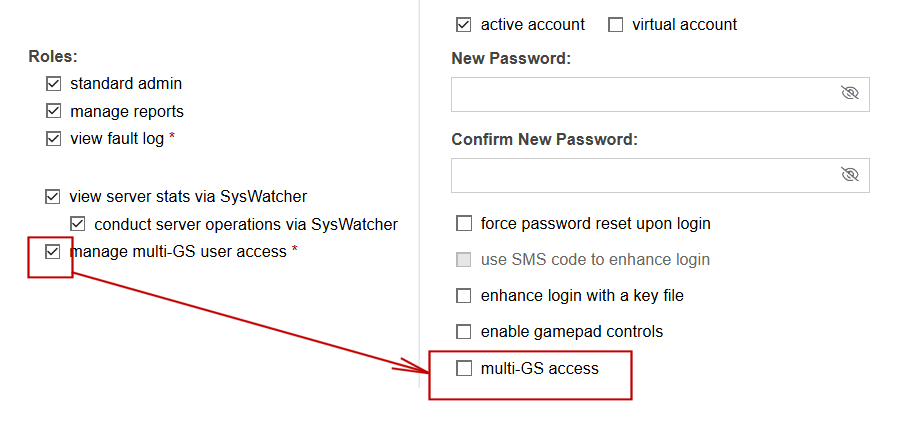
In the user editor, administrators with the multigsedit role will see a new Multi-GS Access section below the security settings.
Checking the multi-GS access checkbox expands a list of accessible organizations. The user's home GS always appears at the top of the list, labeled default. It cannot be removed because it is the user's primary tenant.
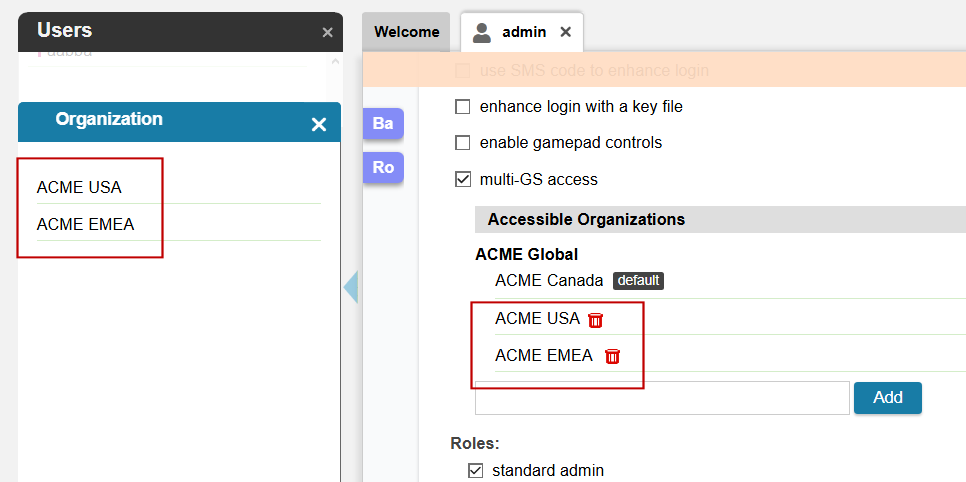
To grant access to an additional GS, the administrator types in the search field and selects from the lookup popup. Only GS instances that belong to the same GS group as the user's home GS are offered. This ensures cross-tenant access remains within a defined organizational boundary and cannot be used to bridge unrelated tenants.
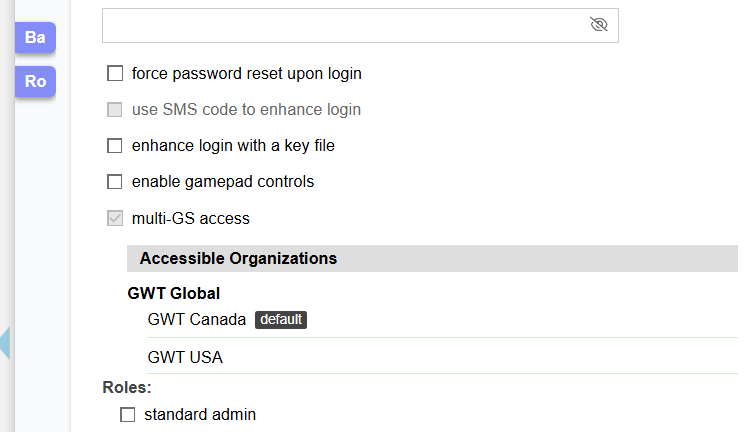
Each additional GS appears in the list with a delete button for revocation. When an administrator without multigsedit views a user who already has Multi-GS access, the section is displayed in read-only mode: the checkbox is disabled, delete buttons are hidden, and the Add control is not shown.
How the User List Changes
For administrators who themselves have Multi-GS access, the user list automatically expands to include users from all authorized GS instances. To make this multi-tenant list navigable, users are grouped by their home GS name, with a clear visual separator between organizations.
The grouping resets at each section boundary (Active Users > Deactivated Users > Virtual Accounts), so the GS name header always re-appears at the top of each section even if the same GS spans multiple status groups.
For administrators without Multi-GS access, the user list behaves exactly as before - no GS name headers are shown, no cross-tenant data is loaded.
For Programmers: Using Get_gsids_for_user
The gscore package exposes a single function for resolving the complete set of GS IDs visible to a user:
gsids := gscore.Get_gsids_for_user(userid)
userid is the string user ID. The return value is []string — a slice of GS ID strings in the following guaranteed order:
- The user's home gsid (always first)
- Any additional xgsids from user_xgsids, in insertion order, deduplicated
The list is fully combined. You do not need to add the home gsid separately on the consuming end; it is always included. This makes it safe to pass the result directly into an IN (...) clause without any extra merging logic:
gsids := gscore.Get_gsids_for_user(ctx.user.userid)
if len(gsids) > 0 {
placeholders := strings.Repeat("?,", len(gsids))
placeholders = placeholders[:len(placeholders)-1]
query += " AND gsid IN (" + placeholders + ") "
for _, id := range gsids {
params = append(params, id)
}
}
If the user has no Multi-GS authorization (or the userid is empty), the function returns nil, and you can fall back to a single gsid = ? filter - exactly what GyrosGo does internally in the user list query.
Smart Caching: Minimal Performance Overhead
Get_gsids_for_user is cache-backed with a 30-minute TTL, so repeated calls within a session never touch the database. Any change to a user's Multi-GS configuration, through the UI or a programmatic update; immediately invalidates the cache, so the next call always reflects current state. Safe to call freely; the database is only occasionally involved.
